This is the most important configuration step in WaterfallOne. Your waterfall defines exactly how cash flows from a distribution to your investors and sponsor: every tier, every split, every calculation rule. This guide covers the entire waterfall builder: both waterfall types, class structures, all five tier types and their options, and the review process. If you want to understand the concepts behind each tier first, start with Understanding Waterfall Tiers.
Two Waterfall Types
Every waterfall in WaterfallOne is one of two types. You choose the type when creating the waterfall, and it determines which tier types are available and how the calculation engine processes distributions.
Operating Distributions
Use this type for regular, recurring cash flow distributions: quarterly operating income, monthly rental income, or any distribution from ongoing operations. Operating waterfalls use four tier types: Return of Capital, Preferred Return, GP Catch-Up, and Promote Split. These waterfalls run repeatedly over the life of the fund as cash comes in from operations.
Capital Events (Sale, Refinance)
Use this type for one-time liquidity events like property sales, refinances, or fund liquidation. Capital event waterfalls have access to all five tier types, including True-Up. The True-Up tier is exclusive to capital event waterfalls because it's a final reconciliation that only makes sense at exit. It adjusts allocations so the GP hits their exact target profit share after accounting for everything that happened during the hold period.
The Waterfall Builder
The builder walks you through waterfall creation in two steps, then a review screen. You can enter the builder from the Waterfall Library, during new asset onboarding, or from an asset's detail page.
Step 1: Choose a Starting Point
You can start from one of four system templates or build from scratch:
| Template | Structure | Best For |
|---|---|---|
| Simple 2-Tier | ROC → 80/20 Promote Split | Simple deals with no preferred return |
| Standard 3-Tier | ROC → 8% Pref → 80/20 Split | Industry standard for most funds |
| Standard 4-Tier with Catch-Up | ROC → 8% Pref → GP Catch-Up → 80/20 Split | Institutional-grade with GP catch-up |
| Multi-Hurdle Promote | ROC → 8% Pref → 1.5x EM → 2.0x EM → Split | Escalating carry at higher returns |
Templates pre-fill the tier configuration with standard values. You can modify every field after loading a template. They're a starting point, not a constraint. If none of these match your deal, skip template selection and build custom tiers from an empty tier list.
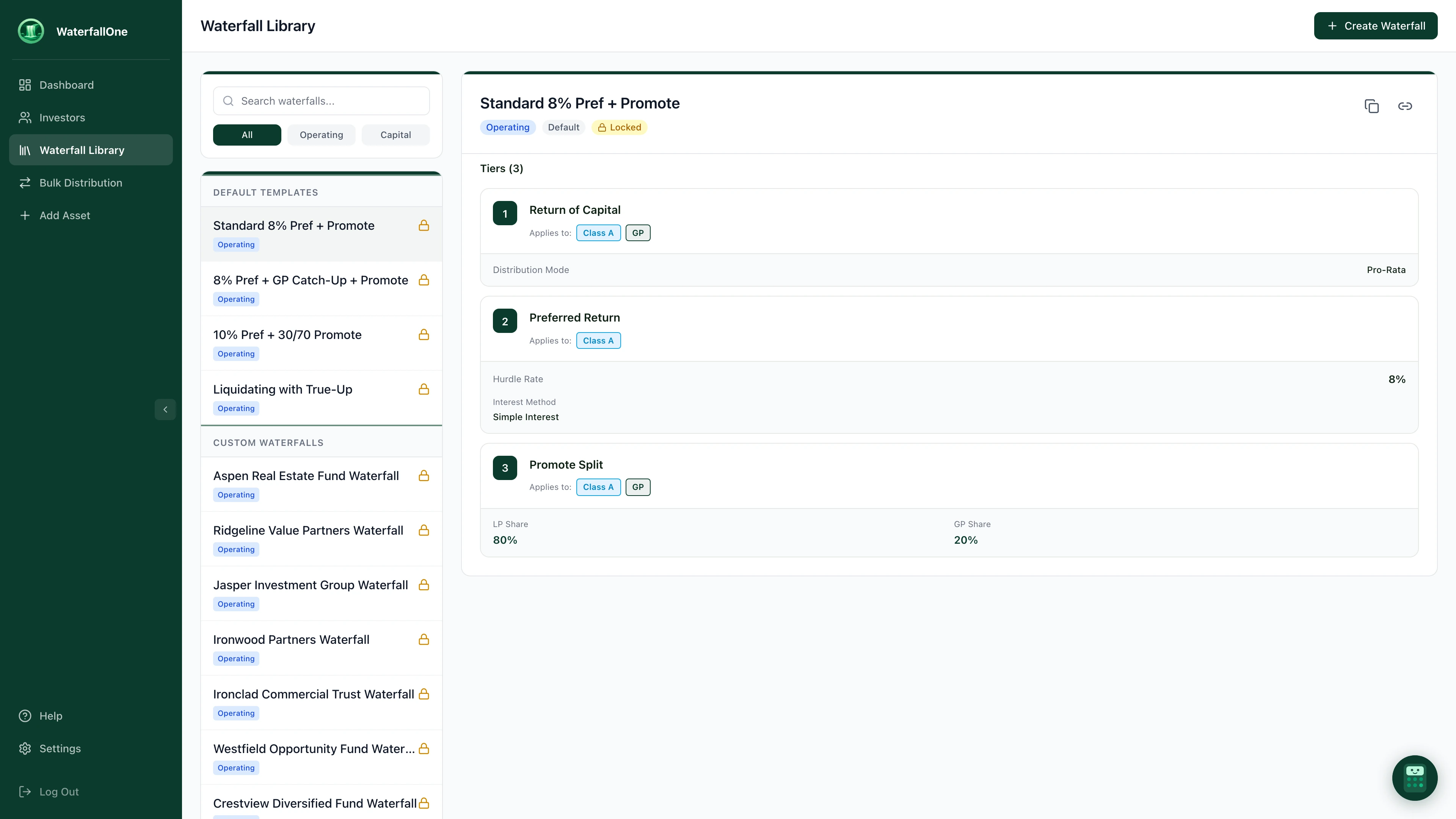
The Waterfall Library. Select a template to preview its tiers, or create a new waterfall from scratch.
Step 2: Configure Your Waterfall
This is where you define everything. The builder has two columns:
Left column: Waterfall Basics
- Name: Give it something descriptive (e.g., "Aspen Real Estate Fund Waterfall")
- Type: Operating Distributions or Capital Events
- Notes: Optional internal notes for your team
- Class Structure: Define your GP and investor classes (see below)
Right column: Tier Builder
- Add, remove, and reorder tiers
- Expand any tier to configure its specific options
- Real-time validation flags issues as you build
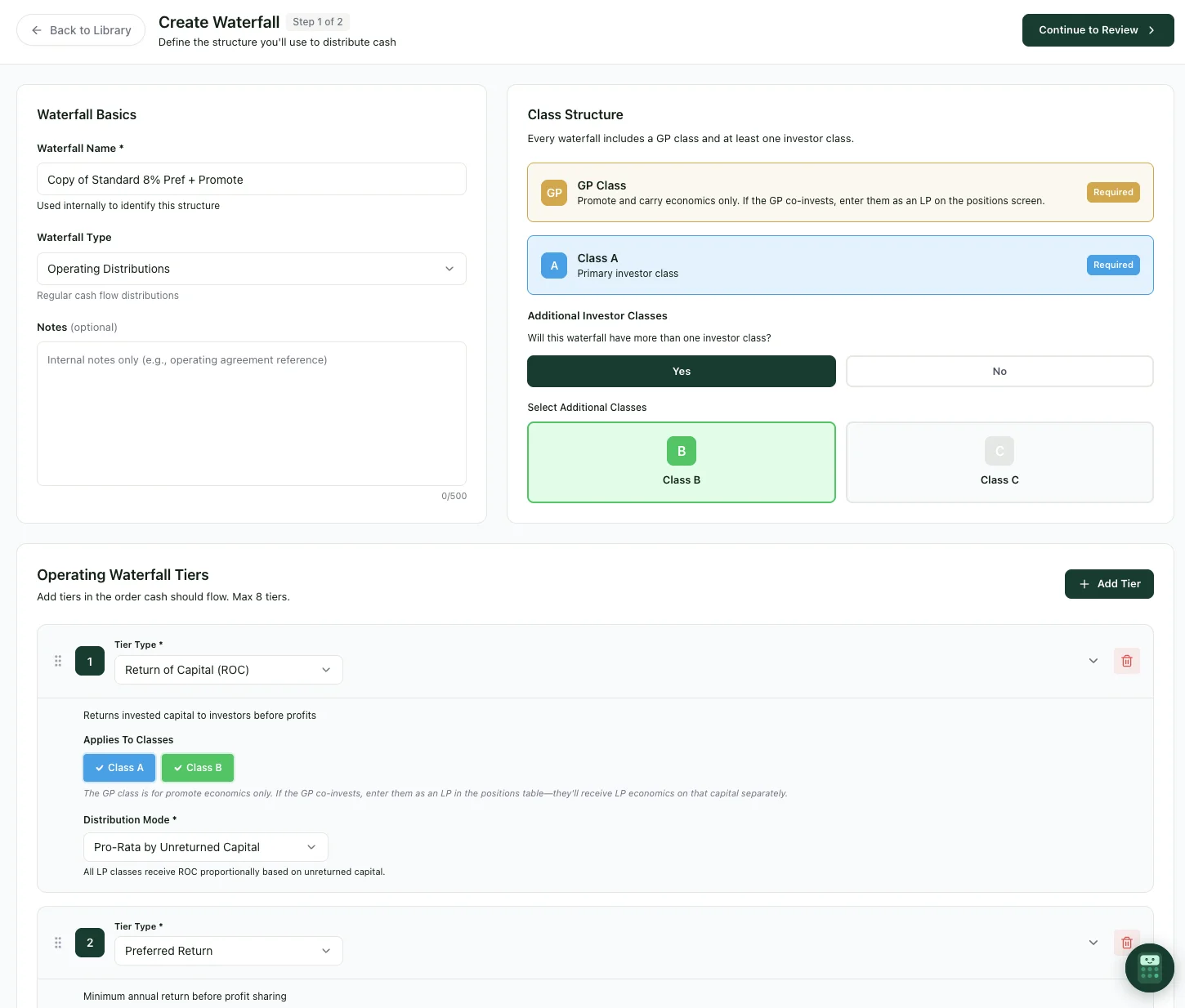
The waterfall builder. Set basics and class structure on the left, then add and configure tiers below.
Class Structure
Before configuring tiers, you need to define your investor classes. Every waterfall has at least two classes:
GP Class: Always required. This represents the sponsor's promote and carry economics. If your GP also co-invests capital alongside LPs, they enter as an LP on the positions screen. The GP Class here is solely for carry allocation.
Class A (Investor Class): Always required. This is your primary LP class. For most single-class funds, GP + Class A is all you need.
If your fund has multiple investor classes with different economics (e.g., a co-GP class, a preferred LP class, or different vintages), you can add Class B, Class C, and beyond. Each additional class can have its own preferred return rate, ROC priority, and promote split allocation.
The Five Tier Types
Each tier type has specific configuration options that control exactly how cash is allocated. Here's every option available for each tier.
Return of Capital (ROC)
Returns invested capital to LPs before anyone earns profit. This is typically the first tier in any waterfall.
Configuration options:
Distribution Mode: How capital is returned across investors:
- Pro-Rata by Unreturned Capital: Each LP receives a share proportional to their remaining unreturned capital. If $500k is available and LP-A has $200k unreturned while LP-B has $300k, LP-A gets 40% and LP-B gets 60%. This is the standard approach for most funds.
- Sequential (by Class Priority): Classes are paid in priority order. All of Class A's capital is returned before Class B receives anything. Useful when one class has seniority over another (e.g., preferred equity above common equity).
Applies To: LP classes only. The GP Class is excluded from ROC because the GP doesn't contribute capital through this tier. If your GP co-invests, their capital is tracked through their LP position.
Preferred Return
Provides LPs a minimum annual return (the "hurdle") on their unreturned capital before the GP earns carry. This is what aligns GP and LP interests. The GP only participates in profits after LPs hit their target return.
Configuration options:
Hurdle Rate: The annual preferred return rate as a percentage (e.g., 8%). This is the annualized rate that accrues on each LP's unreturned capital between distributions. Industry standard ranges from 6% to 12%.
Per-Class Rates: Optional. If your fund has multiple investor classes with different economics, toggle this on to set a separate hurdle rate for each class. For example, Class A at 8% and Class B at 10%.
Interest Method: How unpaid preferred return accumulates over time:
- Simple Interest: Pref accrues only on unreturned capital. Unpaid pref from prior periods does not itself earn additional pref. This is the most conservative method and easiest to understand.
- Annual Compound: Unpaid pref is added to the accrual base once per year. So if an LP has $100k unreturned capital and $8k unpaid pref at year-end, next year's pref accrues on $108k. This results in higher total pref over time.
- Quarterly Compound: Same as annual, but unpaid pref compounds every quarter. Accrual base updates four times per year.
- Monthly Compound: Unpaid pref compounds monthly. This is the most aggressive compounding method and results in the highest total preferred return.
Applies To: LP classes only. The GP does not accrue preferred return.
GP Catch-Up
After LPs have received their preferred return, the catch-up tier allocates 100% of the next tranche of cash to the GP until the GP has received a target percentage of total profits. This "catches up" the GP's economics before moving to a standard promote split.
Configuration options:
GP's Share During Catch-Up: Typically set to 100%. During the catch-up period, 100% of available cash is directed to the GP by default. While this value is technically configurable, most funds leave it at 100% because the entire purpose of a catch-up is to rapidly bring the GP to their target.
Target GP Share: The percentage of total profits the GP should reach before catch-up ends. Typically 20%. If total profits to date are $100k and the GP has received $0 (because everything so far went to LP pref), catch-up allocates cash to the GP until they've received $20k (20% of the $100k).
Catch-Up Target Basis: How "total profits" is calculated for the target:
- Total Profits: GP target is a percentage of combined LP + GP profits. This is the standard approach. With a 20% target, the GP gets 20% of everything earned above return of capital.
- LP Profits Only: GP target is a percentage of LP profits only. Less common, but sometimes specified in fund agreements where the GP's carry is benchmarked against LP returns rather than total fund profits.
Applies To: GP Class only. The catch-up tier is exclusively for the sponsor.
Requirement: A Preferred Return tier must exist above the catch-up. The catch-up makes no sense without a pref hurdle. There's nothing to "catch up" to if LPs haven't received a preferred return first.
Promote / Profit Split
After all hurdles are met (capital returned, pref paid, catch-up satisfied), the promote tier splits all remaining cash between LPs and GP according to your carry agreement. This is where the GP earns their incentive fee.
Configuration options:
Split Mode:
- Standard GP/LP Split: A single split ratio applied to all LP classes. For example, 80% to LPs and 20% to GP. The LP and GP percentages must total 100%.
- Per-Class Split: Individual allocation percentages for each class. Useful when different investor classes negotiate different promote economics. For example: GP gets 20%, Class A gets 60%, Class B gets 20%. All class percentages must total 100%.
Hurdle Type: Whether this promote tier runs indefinitely or has a return threshold:
- No Hurdle (Perpetual): This split applies to all remaining cash with no upper limit. Use this for the final promote tier in your waterfall. Every waterfall must end with a perpetual promote tier (or a true-up after it).
- Equity Multiple: This split applies only until investors reach a specific equity multiple (e.g., 1.5x). Once that multiple is achieved, remaining cash flows to the next tier, which typically has a more GP-favorable split. This is how you build escalating promote structures.
When using Equity Multiple hurdles, two additional options appear:
- Multiple Calculation Method: Deal-Level Excluding Promote uses total capital from all investors, and distributions exclude carry already paid to the GP. LP-Only uses only LP capital and LP distributions, which is common when the GP has no co-invested capital.
- Capital Base: Initial Capital means the equity multiple denominator is capital contributed at deal inception only. Total Contributed Capital includes all contributions over the life of the deal, including mid-period capital calls.
Applies To: All classes by default. Can be restricted to specific classes if needed.
True-Up (Capital Events Only)
A final reconciliation tier that runs at liquidation to ensure the GP receives their exact target share of total profits across the life of the fund. This tier is only available in capital event waterfalls.
Configuration options:
Target GP Percentage: The final target GP share of total profits (e.g., 20%). After all other tiers have run, the true-up checks whether the GP has actually received 20% of total cumulative profits. If the GP is under target, additional cash is allocated to GP. If the GP is over target (rare), the excess is redirected to LPs.
Position: Must be the last tier in the waterfall. Nothing can follow a true-up.
Applies To: All classes, for final reconciliation.
Reviewing Your Waterfall
After configuring all your tiers, click Continue to reach the review screen. This shows a complete summary of your waterfall (name, type, classes, and every tier with its configuration) so you can verify everything before saving.
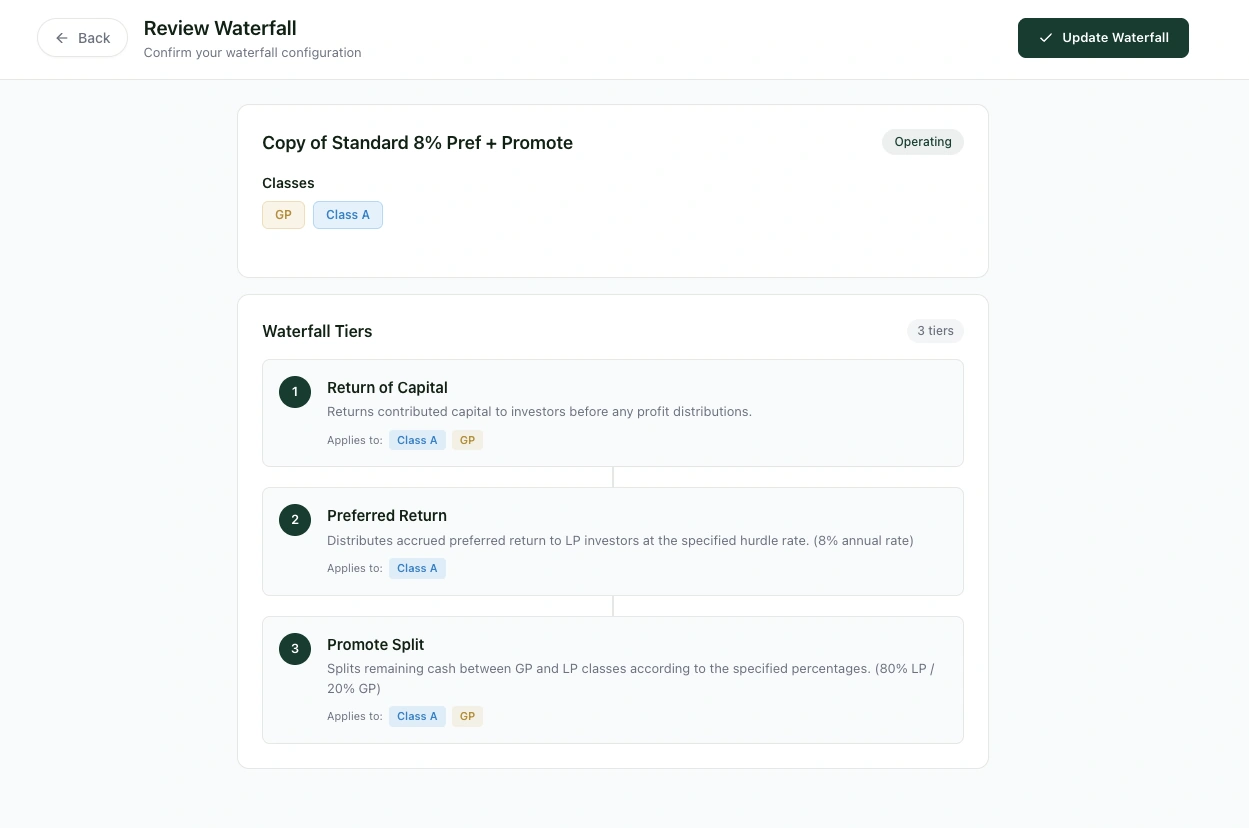
The review screen. Verify every tier before saving your waterfall.
From the review screen you can go back to edit, save to your Waterfall Library for reuse across assets, or assign the waterfall directly to an asset.
Validation Rules
WaterfallOne validates your waterfall in real time as you build it. Some rules block saving (errors), while others are flagged but allowed (warnings).
Errors (Must Fix)
- Return of Capital must be the first tier (if present)
- Only one ROC tier allowed per waterfall
- Only one Preferred Return tier allowed
- Only one GP Catch-Up tier allowed
- Catch-Up requires a Preferred Return tier above it
- Catch-Up must apply to the GP Class only
- Preferred Return cannot come after a Promote tier
- Promote split percentages must total 100%
- The waterfall must end with a perpetual promote tier (no hurdle)
- True-Up must be the last tier (if present)
- True-Up is only available in capital event waterfalls
- Each tier must have at least one class assigned
Warnings (Worth Checking)
- No ROC tier: LPs won't get their capital back before profits are split. This is unusual but valid for some deal structures.
- Pref rate above 20%: This is unusually high. Typical range is 6–12%. Double-check it matches your fund agreement.
- GP promote above 50%: This heavily favors GP economics. Make sure it's intentional.
- Capital event waterfall without a True-Up: Consider adding a true-up for final precision at liquidation.
Templates vs Building from Scratch
Templates are a shortcut to battle-tested waterfall structures. Use them if your fund follows a standard pattern. The Standard 3-Tier with 8% pref and 80/20 promote covers the majority of real estate funds.
Build custom tiers when your fund has unique economics: different carry tiers by equity multiple, multiple investor classes with different pref rates, or unusual tier ordering. Custom waterfalls have access to every configuration option described above, and they're validated with the same rigor as template-based waterfalls.
Either way, you can save any waterfall to your Waterfall Library for reuse across future assets.
Editing and Duplicating Waterfalls
Not every waterfall can be freely edited. WaterfallOne enforces restrictions to protect the integrity of past distributions:
- Default system templates cannot be edited. You can assign them directly to assets, or duplicate them to create a customizable copy with your own modifications.
- Waterfalls assigned to assets with existing distributions cannot be modified. Once a waterfall has been used in a completed distribution, its configuration is locked. To make changes, use Duplicate and save as new to create a variant you can edit freely.
- Unlocked waterfalls (not yet used in any distribution) show both Edit and Duplicate buttons, giving you full flexibility.
- Locked waterfalls only show the Duplicate option with a tooltip reading "Duplicate and save as new."
What's Next
Once your waterfall is configured:
- Import Your Investors: Add LPs and their capital commitments before running a distribution. See Importing Investors via CSV.
- Run a Distribution: Execute your waterfall with real numbers. See Running a Distribution.
- Review the Concepts: For a deeper understanding of how each tier calculates, see Understanding Waterfall Tiers.